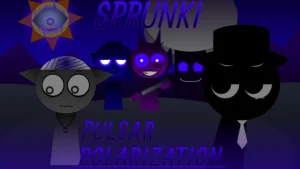




























The musical stage undergoes a striking transformation in Sprunki - Pulsar Polarization, a community-crafted mod that brings a fresh atmosphere to the familiar rhythm-building formula. In this version, players are invited to step onto a widescreen stage where the visual and auditory landscapes shift dynamically. As you layer your beats, the environment reacts directly to your arrangement, building up to a dramatic transition in Phase 2 where the background and character animations morph to match the evolving intensity of the track.
This mod places a strong emphasis on sound clarity and balance. Key audio tracks have been carefully adjusted and made louder, ensuring that every subtle rhythm, vocal loop, and instrumental effect remains perfectly hearable even during complex, multi-layered mixes. Players can drag and drop characters onto the stage, utilizing individual controls like Mute, Focus, and Remove to fine-tune their custom soundscapes. The classic tension of the Sprunki formula remains intact, allowing players to experiment with different character combinations to uncover hidden phases and eerie shifts.
Developed by the collaborative team of @skoller, @Shadowmilkgaming, @TheMythicFox, and @awesomeofsauce, Sprunki - Pulsar Polarization V3.0 is built upon the "Jaybox Sprunke Template: 16:9 Version" originally created by @JayGames. The community has met the release with high praise; player Jevin_Officialz called it a "PEAK MOD," while fellow creator jaskon the mod maker celebrated the experience, noting the "NICE LORE" suggested by the atmospheric shifts. This polished, community-submitted mod is now available to play directly on Sprunki.cool, offering a finely tuned audio-visual journey for fans of creative music mixing.
Loading comments...